 Back to Blogs
Most "how to add an AI chatbot to your website" guides end with a script tag from a SaaS tool and a monthly bill. That works for some sites. But a lot of the business owners who message me want something slightly different: a chatbot that answers from their content, sounds like their business, hands serious leads to a human, and does not cost a fortune per month.
I build these for clients as part of my AI integration work, so in this post I will walk you through how I actually do it. You will see the architecture, the PHP code for the server side, a tiny front-end widget, what it costs to run, and the mistakes I see most often. If you run WordPress, Laravel or a plain PHP site, all of this applies.
First, decide what kind of chatbot you need
Before writing any code I ask one question: what should the bot do that your website does not already do? The honest answers usually fall into three groups:
- Answer repetitive questions. Prices, delivery times, opening hours, refund rules, "do you work with X". This is the most common case and the easiest win.
- Qualify leads. Ask two or three questions about budget and timeline, then pass the conversation to you by email or WhatsApp.
- Help customers inside a product. Look up an order, explain a feature, walk someone through a setup. This needs access to your database and more careful permissions.
Write down which one you want. It decides how much data the bot needs, how strict its instructions must be, and whether a no-code tool is enough.
Option 1: a no-code chatbot tool
There are plenty of hosted chatbot services where you paste your sitemap, they crawl your pages, and you get a script tag to drop before the closing </body> tag. On WordPress you add that snippet through a header and footer code plugin or your theme. For a simple FAQ bot on a brochure site, this is often the right call.
Where they get uncomfortable:
- You pay per seat or per message tier, and the price climbs as traffic grows.
- Your conversations and leads live on someone else's dashboard.
- The widget adds its own JavaScript, which can hurt your page speed if it loads eagerly.
- Connecting it to your own database (orders, bookings, stock) is limited or locked behind higher plans.
Option 2: build it on your own site with the OpenAI API
This is what I usually recommend for businesses that already have a custom PHP or Laravel site, or that want full control. The idea is simple and it is called retrieval augmented generation (RAG): you do not "train" the model on your website. Instead, for every question you look up the most relevant pieces of your own content and send them to the model along with strict instructions to answer only from that material.
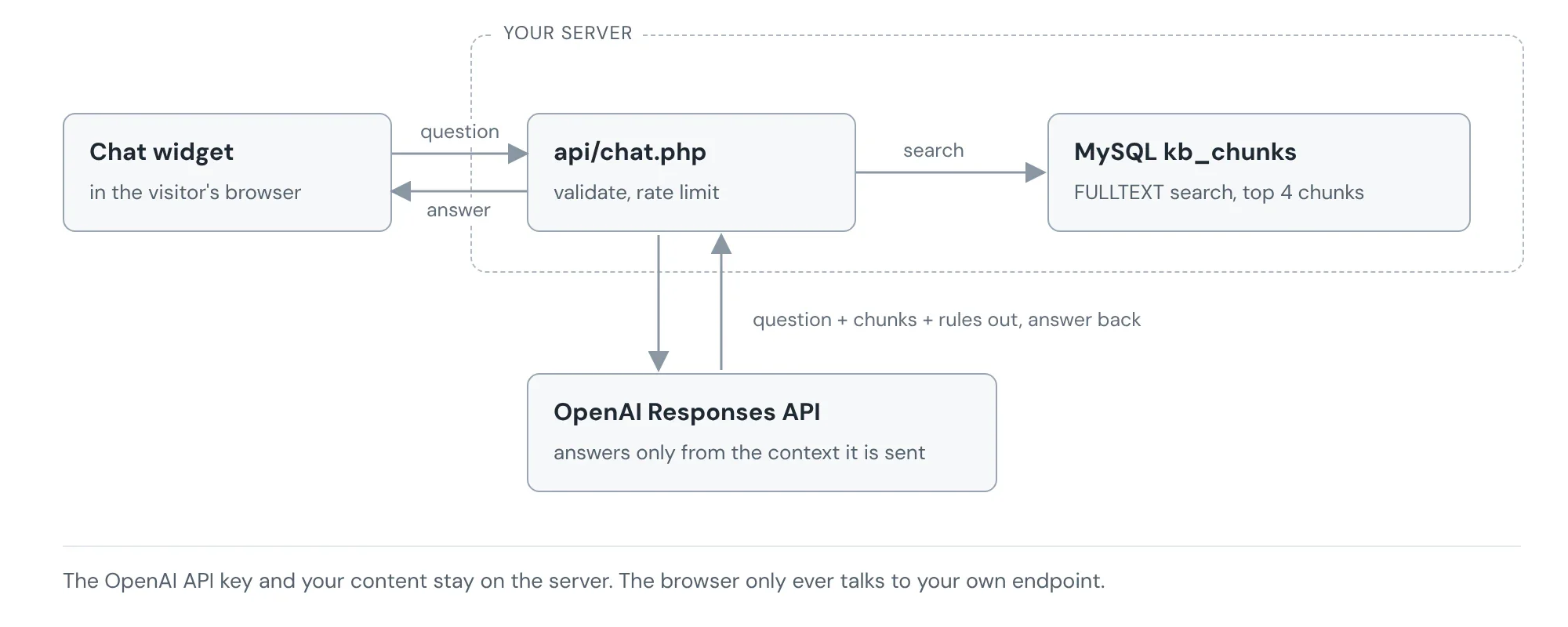
Here is the flow in plain words:
- The visitor types a question in a small chat widget on your page.
- The widget sends it to your server, never straight to OpenAI. Your API key must stay on the server. OpenAI's own API key safety guide is clear about not exposing keys in browser code.
- Your server finds the three or four most relevant chunks of your content.
- It sends the question, those chunks and your rules to the model.
- It returns the answer, plus a contact link when the bot is not sure.
Step 1: put your knowledge in one table
For most small and medium business sites, you do not need a vector database on day one. A MySQL table with a FULLTEXT index does a surprisingly good job when your content is a few dozen pages of services, FAQs and policies. I split long pages into chunks of a few paragraphs each so the model gets focused context.
CREATE TABLE kb_chunks (
  id INT UNSIGNED AUTO_INCREMENT PRIMARY KEY,
  source_url VARCHAR(255) NOT NULL,
  title VARCHAR(200) NOT NULL,
  body TEXT NOT NULL,
  updated_at DATETIME NOT NULL DEFAULT CURRENT_TIMESTAMP ON UPDATE CURRENT_TIMESTAMP,
  FULLTEXT KEY ft_kb (title, body)
) ENGINE=InnoDB DEFAULT CHARSET=utf8mb4;

-- used by the rate limit in step 2
CREATE TABLE chat_hits (
  id BIGINT UNSIGNED AUTO_INCREMENT PRIMARY KEY,
  ip VARCHAR(45) NOT NULL,
  created_at DATETIME NOT NULL DEFAULT CURRENT_TIMESTAMP,
  KEY idx_ip_time (ip, created_at)
) ENGINE=InnoDB;
You can fill it from your CMS whenever a page is saved, or with a small script that reads your sitemap. If your content grows into hundreds of pages, or people ask questions with very different wording from your copy, that is the point where I move to embeddings and a proper vector search.
Step 2: the PHP endpoint
This is the heart of it. It validates the message, applies a simple rate limit, pulls matching chunks and calls the OpenAI Responses API. I keep the model name in config so it can be changed without touching code.
<?php
// api/chat.php
declare(strict_types=1);
require __DIR__ . '/../includes/bootstrap.php'; // gives us db() and config()

header('Content-Type: application/json');
$in = json_decode(file_get_contents('php://input'), true) ?? [];
$question = trim((string) ($in['message'] ?? ''));

if ($question === '' || mb_strlen($question) > 600) {
    http_response_code(422);
    exit(json_encode(['error' => 'Please type a shorter question.']));
}

// 1. Rate limit: 20 questions per IP per hour
$ip = $_SERVER['REMOTE_ADDR'] ?? '0.0.0.0';
$st = db()->prepare('SELECT COUNT(*) FROM chat_hits WHERE ip = ? AND created_at > NOW() - INTERVAL 1 HOUR');
$st->execute([$ip]);
if ((int) $st->fetchColumn() >= 20) {
    http_response_code(429);
    exit(json_encode(['error' => 'Too many questions. Please use the contact form.']));
}
db()->prepare('INSERT INTO chat_hits (ip) VALUES (?)')->execute([$ip]);

// 2. Retrieve the most relevant chunks
$st = db()->prepare(
    'SELECT title, body, source_url FROM kb_chunks
     WHERE MATCH(title, body) AGAINST (? IN NATURAL LANGUAGE MODE)
     ORDER BY MATCH(title, body) AGAINST (? IN NATURAL LANGUAGE MODE) DESC
     LIMIT 4'
);
$st->execute([$question, $question]);
$context = '';
foreach ($st->fetchAll() as $row) {
    $context .= "### {$row['title']} ({$row['source_url']})\n{$row['body']}\n\n";
}

// 3. Ask the model, with strict rules
$payload = [
    'model'        => config('openai_model'),   // e.g. a small, low cost model
    'instructions' => 'You are the website assistant for ' . config('business_name') . '. '
        . 'Answer ONLY from the context below. If the answer is not there, say you are not sure '
        . 'and suggest the contact page. Keep answers under 120 words. Never invent prices.',
    'input'        => "Context:\n{$context}\nQuestion: {$question}",
    'reasoning'    => ['effort' => 'low'],
    'max_output_tokens' => 400,
    'store'        => false,
];

$ch = curl_init('https://api.openai.com/v1/responses');
curl_setopt_array($ch, [
    CURLOPT_POST           => true,
    CURLOPT_RETURNTRANSFER => true,
    CURLOPT_TIMEOUT        => 30,
    CURLOPT_HTTPHEADER     => [
        'Content-Type: application/json',
        'Authorization: Bearer ' . getenv('OPENAI_API_KEY'),
    ],
    CURLOPT_POSTFIELDS     => json_encode($payload),
]);
$res = json_decode((string) curl_exec($ch), true);
curl_close($ch);

// 4. Collect the text parts of the reply
$answer = '';
foreach ($res['output'] ?? [] as $item) {
    if (($item['type'] ?? '') !== 'message') continue;
    foreach ($item['content'] ?? [] as $part) {
        if (($part['type'] ?? '') === 'output_text') $answer .= $part['text'];
    }
}

echo json_encode(['answer' => $answer ?: "Sorry, I could not answer that. Please use the contact page."]);
A few details here matter more than they look. The loop at the end reads every text part of the reply, because OpenAI's docs warn that the output array can contain more than one item, so you should not assume the text sits at a fixed position. store is set to false so responses are not kept for later retrieval. And the instructions tell the model what to do when the context has no answer, which is the single biggest fix for made up replies.
Step 3: a small, fast chat widget
The front end does not need a framework. I load the widget only after the visitor clicks the chat bubble, so it adds almost nothing to the initial page load. Note the use of textContent, which stops any HTML in an answer from being injected into your page.
<button id="chat-open" aria-controls="chat-box" aria-expanded="false">Ask a question</button>
<div id="chat-box" hidden>
  <div id="chat-log" aria-live="polite"></div>
  <form id="chat-form">
    <input id="chat-input" maxlength="600" placeholder="Type your question" required>
    <button>Send</button>
  </form>
</div>

<script>
const box = document.getElementById('chat-box');
const log = document.getElementById('chat-log');
const openBtn = document.getElementById('chat-open');

openBtn.addEventListener('click', () => {
  box.hidden = !box.hidden;
  openBtn.setAttribute('aria-expanded', String(!box.hidden));
});

function add(text, who) {
  const p = document.createElement('p');
  p.className = 'msg msg--' + who;
  p.textContent = text;          // safe: never innerHTML
  log.appendChild(p);
  log.scrollTop = log.scrollHeight;
}

document.getElementById('chat-form').addEventListener('submit', async (e) => {
  e.preventDefault();
  const input = document.getElementById('chat-input');
  const message = input.value.trim();
  if (!message) return;
  add(message, 'user');
  input.value = '';
  try {
    const r = await fetch('/api/chat.php', {
      method: 'POST',
      headers: { 'Content-Type': 'application/json' },
      body: JSON.stringify({ message })
    });
    const data = await r.json();
    add(data.answer || data.error, 'bot');
  } catch {
    add('Connection problem. Please try the contact page.', 'bot');
  }
});
</script>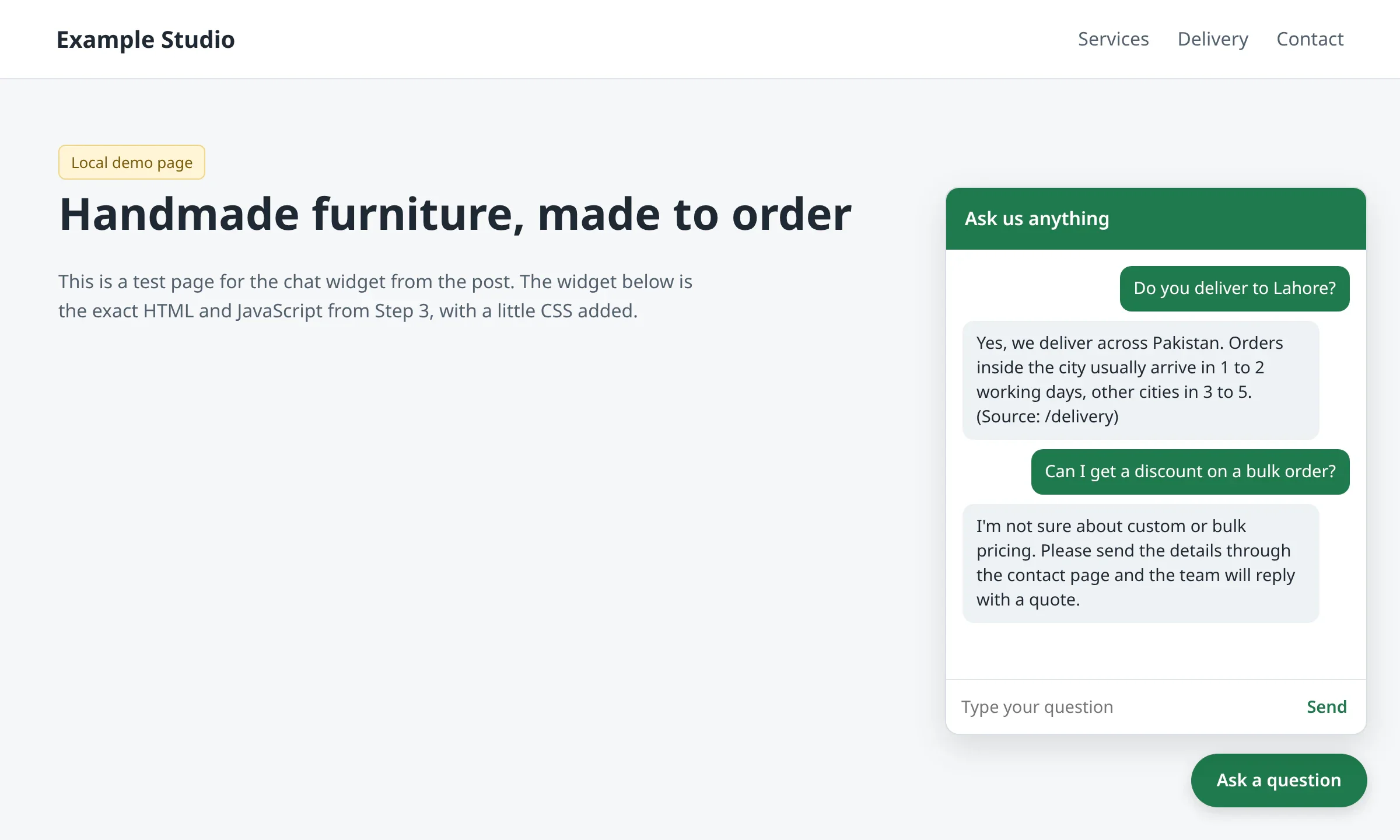
Step 4: hand off to a human
The best chatbots I have built are not the ones that answer everything. They are the ones that know when to stop. I add a rule that any question about a custom quote, a complaint or a refund gets a short reply plus a button to your contact form or WhatsApp. That is where the bot pays for itself, because it turns a curious visitor into a real enquiry you can answer.
Adding the chatbot to WordPress
On WordPress, the same idea works with a REST route instead of a standalone PHP file. You register a route with register_rest_route(), run the same retrieval against your posts or a custom table, and call the API from the server. The widget script then posts to /wp-json/yourbot/v1/chat. Please do not paste your API key into a "custom HTML" block or a plugin setting that prints it into the page source. Exposed keys are one of the most common problems I find when I audit sites.
What does it cost to run?
The API is billed per token, which is roughly per word. At the time of writing, OpenAI's pricing page lists its most cost efficient current model, GPT-6 Luna, at $0.10 per million input tokens and $0.50 per million output tokens. A typical question in this setup sends around 2,500 input tokens (instructions, four chunks and the question) and gets back up to 400 tokens. That works out to about $0.00045 per answer, so 2,000 questions a month costs under a dollar in API fees.
Prices change, so check the pricing page before you plan a budget. In practice the bigger costs are building it properly, writing good source content and checking conversations for the first few weeks. The API bill is usually the smallest line.
Mistakes I see all the time
- The API key in JavaScript. Anyone can open the browser's developer tools and copy it, then run up your bill.
- No rate limit. Bots and bored visitors will hammer an open endpoint. Even a simple per IP limit like the one above helps.
- No "I don't know" rule. Without it, the model fills gaps with confident guesses about your prices and policies.
- Thin source content. A chatbot can only be as good as the pages behind it. If your FAQ is three lines long, the bot will be weak too.
- Loading the widget on page load. Load it on click or after the page is idle so it does not hurt your Core Web Vitals.
- No privacy notice. Tell visitors their messages are processed by an AI service, and ask them not to share sensitive data in chat.
FAQ
Can I train ChatGPT on my own website?
Not in the sense most people mean. You do not retrain the model. You use retrieval: your content is searched for every question and passed to the model as context. Update a page, refresh that chunk, and the answers change right away.
Is it free to add an AI chatbot to a website?
Some hosted tools have free tiers with message limits and their branding on the widget. A custom build has no subscription, but you pay for development and a small usage based API bill.
Will a chatbot slow down my website?
It does not have to. Load the widget script only when someone opens the chat, keep it small, and it will not affect how fast your page first appears.
Do I need a vector database?
Not for most small business sites. A FULLTEXT index on a well organised knowledge table is enough to start. Move to embeddings when your content gets large or questions get more varied.
Want one on your site?
If you want an AI assistant that answers from your own content, keeps your API key safe and passes real leads to you, I can help. I have built over 1,000 web projects, and AI chatbots and OpenAI integrations are now a regular part of that work. Tell me about your website and what you want the bot to handle, and I will reply with a clear plan and quote.